
Someone searching a CRM shortlist for a 20-person revenue org may see the shortlist settle before your homepage gets a shot. If your brand is missing there, the deal may still happen, but it starts with a competitor’s name on the answer.
CRM vendors win AI recommendations when assistants can point to enough public proof to name them for a specific fit, comparison, or migration question. The leverage comes from building pages the model can quote back, and in practice that overlaps with answer engine optimization because the buyer wants a recommendation, not a tour of features.
A plain way to say it: GEO shapes the recommendation layer, AEO shapes the answer layer, and CRM content has to serve both.
Why the same CRM names keep showing up
The same CRM names keep appearing because they are easier to defend with public sources, easier to compare, and easier to explain in a shortlist. In broad prompts, incumbents often win by default, not because they are perfect, but because the assistant can support them with less friction.
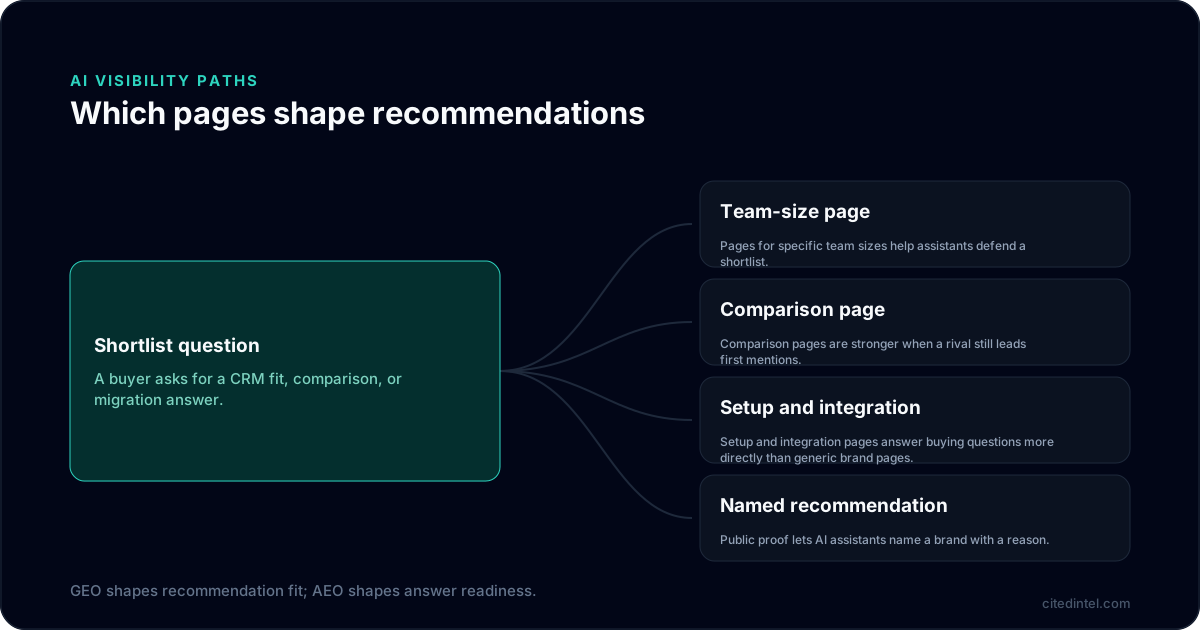
In practice, a challenger breaks that pattern only when the site gives the assistant quotable proof instead of forcing it to infer the fit. Product quality helps, but unquoted quality does not get recommended. A page has to hand the model a claim it can repeat, not just a claim a marketer prefers.
In CRM, HubSpot, Salesforce, and Microsoft Dynamics often surface on broad prompts because they have a thicker public trail around use, ecosystem, and deployment. Microsoft’s own guidance says Copilot can ground responses in web search when web search is enabled, which is one reason current public pages matter so much Microsoft support. The practical test is whether the brand can be named with a reason that matches the prompt, not just because it is familiar.
To test this rather than argue about it, freeze a 30-prompt set for a week and score each answer three ways. Record first mention, total mention, and the source type used in the final answer. Count a brand as “first” only when it opens the recommendation, and leave out prompts that do not return a vendor list. Use the same prompt wording each week, since a wording change can look like a visibility win when the real shift is just a different query. The point is to separate visibility from persuasion, since a vendor can be mentioned without being the recommended fit.
What to record in those 30 prompts
- First mention: which vendor is named first in the recommendation.
- Comparison depth: whether the answer names alternatives or gives a one-name default.
- Source mix: how much the answer relies on vendor pages, reviews, docs, or partner material.
- Prompt family: whether the brand appears on team-size, migration, workflow, or alternative prompts.
The buyer prompts that matter most in CRM
The prompts that matter are the ones that force a choice. Nobody stops at “CRM software” for long; they ask for a fit, a comparison, or a switch.
Use 24 to 36 prompts, no more, and keep the inclusion rule tight. A prompt belongs in the set only if it implies purchase intent, a clear constraint, or a direct alternative search. Skip generic research prompts like “what is CRM” and skip support prompts like “how do I update a pipeline field,” because those do not shape shortlist formation. Group the set by intent so the weekly read can show whether the brand is weak on fit, switch, or setup language.
Prompt families worth tracking weekly
- Team size: “CRM shortlist for a 20-seat revenue team,” “CRM built for a 10-person startup,” “CRM for a 50-seat revenue team.”
- Alternative intent: “HubSpot alternatives for startups,” “Salesforce alternatives for small teams.”
- Workflow fit: “CRM for teams that live in Gmail and Slack,” “CRM for founder-led sales.”
- Stack fit: “CRM that works with Google Workspace,” “CRM that connects to a warehouse and Slack.”
- Migration intent: “move from spreadsheets to CRM,” “switch from HubSpot to another CRM.”
- Region-aware fit: “best CRM for B2B software companies in the UK,” “CRM vendors used by teams in India or the UAE.”
Team-size prompts are usually the easiest place to win because they force the assistant to state tradeoffs. A page built around a 20-seat revenue team can move the shortlist faster than a generic feature page, because it gives the model a clear reason to include or exclude a vendor. The useful detail is not headcount alone, but the admin load, setup speed, and handoff shape tied to that team. A clean way to draft it is: who the team is, what breaks at that size, and what the CRM needs to solve first. If you want the page to carry weight, write for the constraint the buyer is actually trying to solve.
The practical link between buyer language and AI search optimization is simple: mirror the wording buyers use, so the answer has something concrete to cite. The better rule is to pair that wording with a page that answers the constraint behind it, so the model can repeat both the request and the reason. A useful check is whether the page title, subhead, and first proof block all point to the same constraint. If they do not, rewrite the first proof block before you add more copy, because the assistant needs one stable reason to repeat.
Why incumbents dominate the answer layer
Incumbents dominate because answer engines can explain them with less effort. The advantage comes from category certainty, comparison coverage, and ecosystem proof, not just company size.
Category certainty
When a prompt is vague, broad, or under-specified, an assistant reaches for familiar category anchors. That is why broad CRM queries often pull in HubSpot, Salesforce, and Microsoft Dynamics before a challenger gets a look.
HubSpot tends to fit SMB and inbound-growth prompts. Salesforce tends to fit larger, more complex enterprise prompts. Microsoft Dynamics tends to appear when the query hints at Microsoft 365 adjacency, governance, or an IT-managed environment. Microsoft’s Copilot shopping guidance also says responses are influenced by the prompt plus engagement and merchant-data factors, which is another reason public detail matters Microsoft Copilot shopping guidance.
Comparison coverage
Comparison language removes ambiguity, so answer engines tend to favor pages that stack one vendor against another with clear tradeoffs. Incumbents are covered in comparison pages, migration posts, partner writeups, and review content across the web, so the assistant can cross-check the same vendor through more than one source type. A strong comparison page should name the decision rule up top, such as setup speed, admin load, or migration effort, so the model can reuse the same basis for the recommendation.
If you only publish feature pages, the answer layer has to do the comparison itself. It usually resolves that uncertainty by leaning back to the bigger name. That is why a comparison page needs tradeoffs, not just a feature dump, so the model can repeat why one vendor belongs in the set and another does not.
Ecosystem proof
CRM buyers care about integrations, implementation, and handoff risk. If the product works with Gmail, Outlook, Slack, Zapier, or a data stack, that needs to be visible in the page copy and in supporting material, because explicit fit signals are easier for answer engines to repeat than vague positioning.
Market differences show up here as well. Buyers in the US may ask about scale and switching cost, buyers in the UK may care more about procurement and deployment speed, buyers in India may press on affordability and implementation friction, and buyers in the UAE may ask about regional support or data handling. If the site has regional proof, put it in the same page rather than burying it in a footnote, because that is the detail the answer layer can reuse.
What answer engines reward in CRM content
Assistants prefer pages that narrow uncertainty. In CRM, the strongest pages answer the buyer’s question in the same language the buyer used, then give enough proof for the answer to be repeated.
| Page before | Prompt asked | Answer pattern | Asset shipped | What changed next |
|---|---|---|---|---|
| Homepage and feature pages only | “Best CRM for a 20-seat sales team” | Incumbents named first, challenger absent or late | A team-size page with setup, admin load, and fit criteria | The challenger appeared in the shortlist more often, and the answer explanation started citing team-size and implementation fit instead of generic claims |
That kind of before-and-after is more useful than a generic list of content types because it ties the asset to a prompt and a change you can inspect. If nothing shifts, the page was probably too broad, too salesy, or too thin on proof. The useful diagnostic is to ask whether the answer changed its first vendor, its reason, or both.
For CRM teams, the content that tends to help most answers commercial questions fast is alternatives, migration, setup, team size, integrations, and industry fit. A polished brand manifesto rarely changes the answer layer because it does not help the assistant make a recommendation. The test is whether the page gives a reason the assistant can reuse, such as setup load, permissioning, or a named integration path. If the page cannot be reduced to one recommendation line, it still needs sharper proof.
The pages that usually move the answer
- Alternative pages: clear tradeoffs against the incumbent, written without defensive language.
- Team-size pages: fit by team count, not just by company stage.
- Migration pages: switching from spreadsheets or a named competitor.
- Setup pages: implementation steps, data import, and timeline.
- Integration pages: the stack buyers already use, explained in plain language.
OpenAI’s shopping research documentation says ChatGPT shopping research reads trusted sites, cites reliable sources, and synthesizes across many sources into a buyer’s guide, which makes source quality and explicit product detail worth the work OpenAI. For CRM teams, that means the page has to name the fit, the tradeoff, and the source type that supports the claim, or the model has little to repeat.
What to build for different CRM categories
The content mix should change by category. SMB CRM, enterprise CRM, and vertical CRM win in different ways, so the priority order should change too.
For each category, set one measurable outcome to watch: prompt inclusion for SMB, competitor-mention reduction for enterprise, and niche-shortlist share for vertical CRM. If a page fails to change one of those signals after a week, it is probably not the right asset to ship first.
SMB CRM
For SMB CRM, build team-size pages and setup pages first. When the product is meant for small teams, the buyer is trying to avoid admin overhead, long onboarding, and a migration mess, so the content should answer those fears directly. A page that names those constraints gives the assistant a reason to recommend the product without making the model infer the fit.
The weekly threshold I use is simple: treat three of ten tracked SMB prompts as a pass for being in the answer set. If you are below that, prioritize the page type that lifts it fastest.
Enterprise CRM
For enterprise CRM, comparison pages and implementation pages usually deserve priority before more thought leadership. Enterprise buyers need to know how permissions, forecasting, governance, and integrations work, and assistants need that material to explain the recommendation without sounding vague. The fastest filter is whether the page can answer who approves access, how data moves, and what changes during deployment.
If a competitor is still being named first on more than half of your enterprise prompts, build the comparison page first. If that mention rate falls week over week after publication, extend the implementation proof rather than polishing the homepage.
Vertical CRM
For vertical CRM, industry pages and workflow pages are the first move. If you serve healthcare SaaS, logistics tech, legal tech, field service, or hospitality tech, the answer engine should not have to guess the use case from generic product language.
Vertical CRM can move faster because the query is narrower. One strong industry page that cuts competitor mentions is better than five broad posts that never get cited.
A CRM category check with fixed wording
To get a visible result this week, run this exercise and keep the wording fixed.
- Start ChatGPT, Claude, and Gemini. Keep one browser session throughout and avoid logging out and back in during the test.
- Run these seven prompts:
- CRM shortlist for a 20-seat sales team
- HubSpot alternatives for startups
- CRM for founder-led sales
- Simple CRM for a team that lives in Gmail and Slack
- CRM migration from spreadsheets
- Best CRM for outbound sales teams
- CRM for a small business that wants minimal admin work
- Write down three fields for each answer: first vendor named, other vendors named, and the reason given.
- Circle the repeated reason: ease of use, fast setup, integration fit, price, or scale.
- Pick one missing asset: a team-size page, alternative page, migration page, or integration page.
- Publish or update that asset within seven days.
- Re-run the same prompts next week. If the answer did not change, change the asset type, not the headline.
For the scaled version, Citedintel turns this prompt set into ongoing tracking and gap diagnosis instead of a one-off check.
How to read the weekly signal
Do not overcomplicate the dashboard. For CRM AI search optimization, I keep the weekly view to five things: prompt coverage, first mention, repeated competitor names, shipped assets, and answer change after the asset goes live. Add one note on why the answer changed, so you can tell whether the lift came from wording, proof, or source mix.
This is enough to tell you whether the answer layer is moving. If the same rival keeps appearing after you ship the page, you either missed the buyer’s wording or the page does not answer the right question.
One limitation: if the brand has almost no public footprint, answer engines may ignore it until the site has enough explicit proof to compare. In that case, the first job is not to chase every prompt, it is to publish the basic comparison, setup, and fit pages that make the brand legible and repeatable. Without those pages, the model has no stable source to quote, so prompt coverage can rise without the recommendation changing. A practical sequence is comparison first, then setup, then fit, because that order gives the assistant a stable path from category to recommendation.
The practical rule for CRM vendors
Most CRM teams publish too much generic content and too little answerable content. The fix is not more volume, it is sharper pages tied to the prompts buyers actually use. A practical filter: if a page cannot be quoted in a recommendation, it is still marketing, not evidence, so the page needs a claim, a fit condition, or a comparison point. That filter is useful because it forces each page to earn a place in the answer, not just in the sitemap. Keep the claim tied to one prompt family, one reason, and one support page so the assistant can repeat it without inventing the bridge.
If AI search optimization matters, connect each new page to a prompt set, a decision rule, and a weekly review. In practice, that is how generative engine optimization supports answer engine optimization, and how a CRM brand shows up in an assistant for the right reasons.
When the answer layer starts naming you for the team size, the workflow, or the alternative search you care about, the work is paying off. To turn that into a repeatable operating system, start with a free audit and keep the same prompt set next week so you can see whether the new page changed the reason given, not just the brand named.
Frequently asked questions
Why do the same CRM brands keep appearing in AI answers?
They usually have the cleanest public story for assistants to use: who they are for, what they replace, and what they integrate with. They also tend to have more comparison pages, review coverage, and ecosystem mentions. That gives AI systems enough proof to justify naming them again and again.
Which content makes ChatGPT, Claude and Perplexity recommend a CRM?
The most useful content is answerable content, not just brand storytelling. That includes alternative pages, team-size pages, migration guides, use-case pages, and integration pages that clearly explain fit and tradeoffs. These assets help assistants match the product to a specific buyer situation.
What prompts should CRM teams track for AI search optimization?
Track prompts that reflect real buying situations, such as team size, startup stage, alternative intent, workflow fit, and stack fit. Examples include 'best CRM for a 20-person sales team' and 'HubSpot alternatives for startups.' These prompts reveal the criteria assistants use to form recommendations.
How can a challenger CRM compete with HubSpot or Salesforce in AI answers?
A challenger usually wins by owning a smaller, sharper answer instead of trying to beat incumbents across the whole category. The best openings are often around speed, simplicity, migration, or a specific workflow for a defined team size. Clear comparison and use-case content make that position easier for AI to repeat.
What should a weekly AI search optimization workflow look like for CRM?
Run the same prompt set every week, note which vendors appear, identify the missing signal, and publish one substantial asset to close the gap. Then re-check the same prompts the next week to see whether the answer changed. That loop keeps the work tied to actual recommendation patterns.
Do CRM marketing teams need dedicated AI SEO software for this?
It depends on prompt volume. A CRM challenger tracking five buying prompts can start manually. But CRM is one of the most contested categories in AI answers, and covering team size, industry and integration variants quickly means dozens of prompts per engine. That is when AI SEO software or a generative engine optimization tool stops being overhead and starts being the only way to see the whole board.